


What would cause the ATV312 display to flash?
Issue:
Drive's display is flashing.
Product Line:
ATV312
Environment:
All
Cause:
Drive display blinks off and on. Motor does not reach commanded speed. Drive may eventually shuts down with Motor Overload Fault (OLF) or Drive Over Temp Fault (OHF).
Resolution:
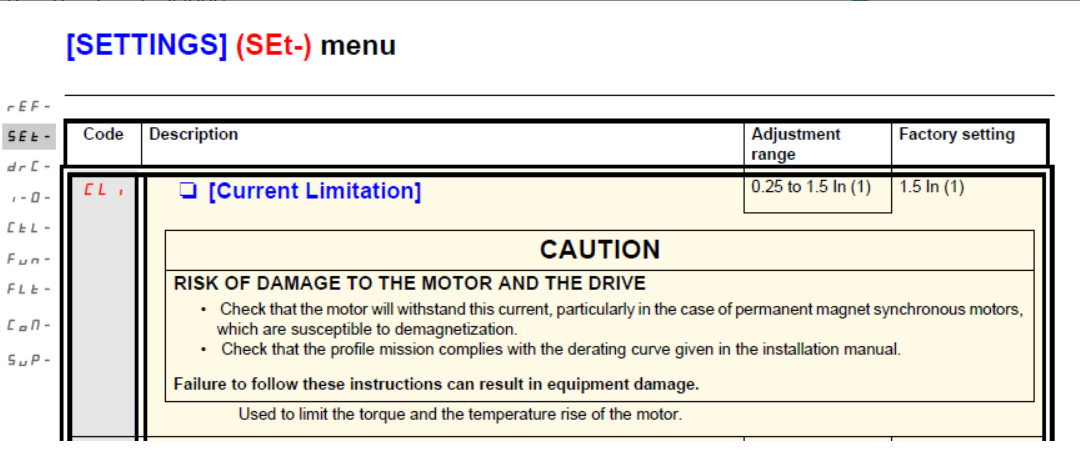
The blinking or flashing display is a warning indication that the motor is pulling the maximum current limit programmed value in the drive which is set by the CLI [Current Limitation] parameter in the SEt- menu as the image below.
Please note the main display on the drive will flash the frequency hz value on and off when its in current limit mode.
The remote HMI VW3A1101 will show CLI in the upper left corner of the HMI if its in Current Limit.
See the ATV312 Programming Manual for further details:
https://www.se.com/us/en/download/document/BBV46385/
Drive's display is flashing.
Product Line:
ATV312
Environment:
All
Cause:
Drive display blinks off and on. Motor does not reach commanded speed. Drive may eventually shuts down with Motor Overload Fault (OLF) or Drive Over Temp Fault (OHF).
Resolution:
The blinking or flashing display is a warning indication that the motor is pulling the maximum current limit programmed value in the drive which is set by the CLI [Current Limitation] parameter in the SEt- menu as the image below.
- Check your load to see if motor direction is correct. If the motor is spinning too fast in the wrong direction, the drive will have a difficult time catching it and correcting the direction. In this case, a mechanical brake on the motor may be necessary
- See if motor is stuck or in a locked rotor.
- Check the drive settings (drC- menu) to be sure the motor nameplate information is entered correctly (UnS, FrS, nCr, nSP, COS)
- Check your the Set- menu to be sure ItH (motor thermal current - Overload protection) and CLI (Current limitation) are set properly.
- Measure motor current draw.
Please note the main display on the drive will flash the frequency hz value on and off when its in current limit mode.
The remote HMI VW3A1101 will show CLI in the upper left corner of the HMI if its in Current Limit.
See the ATV312 Programming Manual for further details:
https://www.se.com/us/en/download/document/BBV46385/
Released for: Schneider Electric USA
