


Is there a way to automatically logout of an Magelis/Harmony HMI after a time interval of inactivity?
Issue:
Is there a way to automatically logout of an Magelis/Harmony HMI after a time interval of inactivity?
Product Line:
Magelis XBTGC/GK/GT, Harmony HMIGTO/STO/STU, Magelis Smart iPC, Magelis Compact iPC, Magelis Flex Box, Magelis Smart Box, Magelis Compact Box, Harmony Panel PC, Harmony Box PC, Harmony P6, Vijeo Designer
Environment:
Vijeo Designer Runtime on HMI
Resolution:
Yes, you can set the Magelis/Harmony HMI to log out after an inactivity time. That setting is in the Security Properties under Inactivity Time-out of the Logout Behavior.
Please see below screenshot for more information.
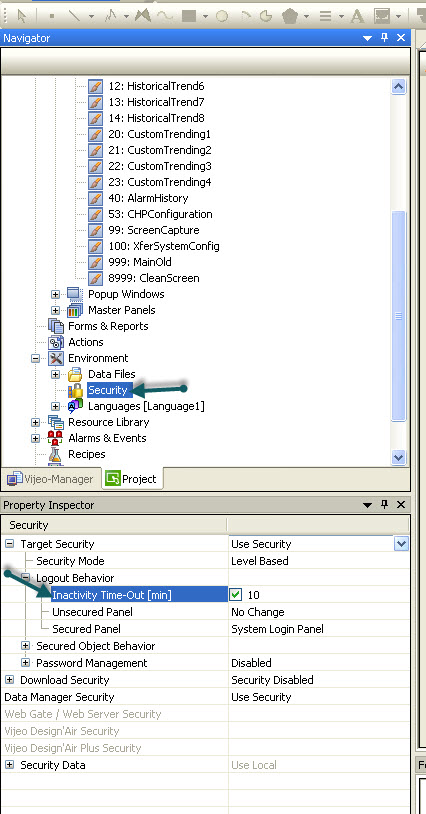
The value of the Inactivity Time-Out is in minutes. When downloading to the target, you will need to check the box to delete the "preserve runtime data" to update the security settings.
Is there a way to automatically logout of an Magelis/Harmony HMI after a time interval of inactivity?
Product Line:
Magelis XBTGC/GK/GT, Harmony HMIGTO/STO/STU, Magelis Smart iPC, Magelis Compact iPC, Magelis Flex Box, Magelis Smart Box, Magelis Compact Box, Harmony Panel PC, Harmony Box PC, Harmony P6, Vijeo Designer
Environment:
Vijeo Designer Runtime on HMI
Resolution:
Yes, you can set the Magelis/Harmony HMI to log out after an inactivity time. That setting is in the Security Properties under Inactivity Time-out of the Logout Behavior.
Please see below screenshot for more information.
The value of the Inactivity Time-Out is in minutes. When downloading to the target, you will need to check the box to delete the "preserve runtime data" to update the security settings.
Released for: Schneider Electric USA
