


Exporting device list from Management Console in SPM/PME
Issue
Process to export a list of devices within PME from Management Console is not clear.
Product Line
Power Monitoring Expert 8.2
Power Monitoring Expert 9.0+
Power Monitoring Expert 2020
Power Monitoring Expert 2021
Power Monitoring Expert 2022
Power Monitoring Expert 2023
Environment
Management Console
Resolution
Use the following steps to create a backup list of devices within SPM/PME that contain: device name, type, address, site and protocol settings.
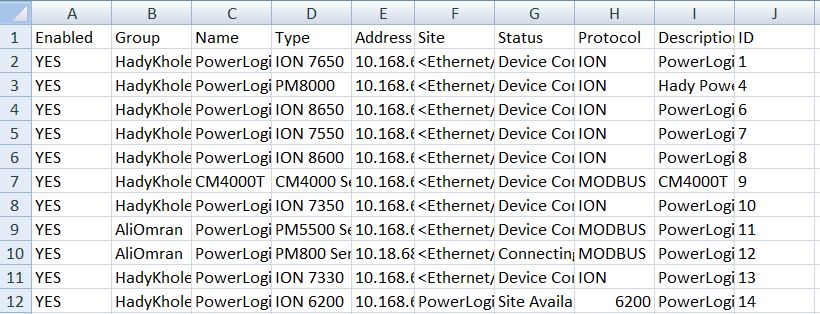
An example of data imported into Microsoft Excel:
This process was improved in PME 2020. Please see Exporting/Importing device list from Device Manager in PME 2020 | Schneider Electric USA (se.com) for how to export the Device Configuration directly into a .csv file using Device Manager.
Process to export a list of devices within PME from Management Console is not clear.
Product Line
Power Monitoring Expert 8.2
Power Monitoring Expert 9.0+
Power Monitoring Expert 2020
Power Monitoring Expert 2021
Power Monitoring Expert 2022
Power Monitoring Expert 2023
Environment
Management Console
Resolution
Use the following steps to create a backup list of devices within SPM/PME that contain: device name, type, address, site and protocol settings.
- Launch Management Console within SPM/PME.
- Select the columns by clicking on the "column selector" at the right-side of the window to select the data type required.
- Click on the 'Devices' tab on the left and select multiple devices by holding down SHIFT/CTRL as required.
- Copy the data to windows clipboard by pressing CTRL-C.
- Paste the data from windows clipboard by pressing CTRL-V to another destination as required.
Note: Data may be imported into Microsoft Excel or any other software that is structured in table format. If the data is imported into another program that is not table-structured, for example Notepad, the data will be need to be re-format the file.
An example of data imported into Microsoft Excel:
This process was improved in PME 2020. Please see Exporting/Importing device list from Device Manager in PME 2020 | Schneider Electric USA (se.com) for how to export the Device Configuration directly into a .csv file using Device Manager.
Released for: Schneider Electric USA
