


String value incorrectly shown as an integer in the OPC UA Sample Client.
Issue
String value incorrectly shown as an integer in the OPC UA Sample Client.
Product Line
OFS
Environment
Windows 10
Resolution
If you view the 'Node Attributes' for a symbol that is defined as a string, it is incorrectly shown as an integer in the
OPC UA Sample Client.
The following steps will demonstrate how to correct the issue:


String value incorrectly shown as an integer in the OPC UA Sample Client.
Product Line
OFS
Environment
Windows 10
Resolution
If you view the 'Node Attributes' for a symbol that is defined as a string, it is incorrectly shown as an integer in the
OPC UA Sample Client.
The following steps will demonstrate how to correct the issue:
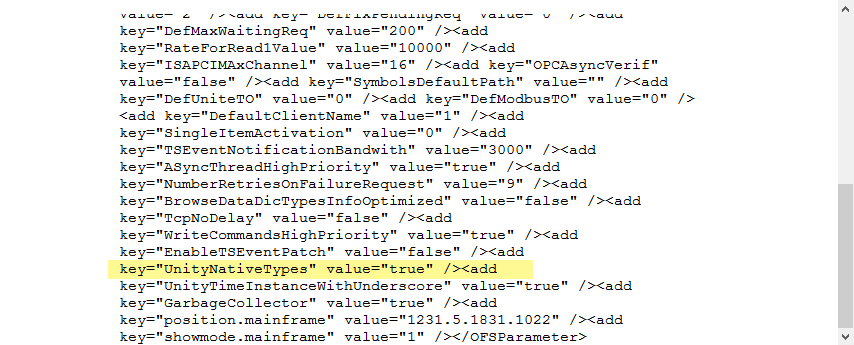
- Navigate to 'C:\ProgramData\Schneider Electric\OFS\3.60.0.0'
- Open and edit the file named OFSInternal.xml' using 'wordpad'
- Locate the text "UnityNativeTypes" value="false"
- Change the text to "UnityNativeTypes" value="true"
- Save the changes.
- Run a test
Released for: Schneider Electric USA
