How can we help you today?

How to fix the error “0xA13D0074” when importing CanOpen EDS “IS620P_CO_V056”?

  1. Issue
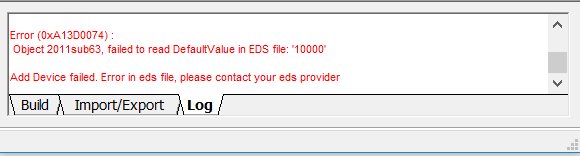
When importing the CanOpen EDS file “IS620P_CO_V056” with Hardware Catalog Manager, an error occurs shown as below snapshot.
  1. Product Line
Control Expert V14.0, Hardware Catalog Manager
  1. Environment
Control Expert V14.0, Win10 64Bit
  1. Resolution
The root cause is that this CanOpen EDS has neither the EtherNet/IP device class nor modular section. Since that the CanOpen EDS cannot be added in the device library.
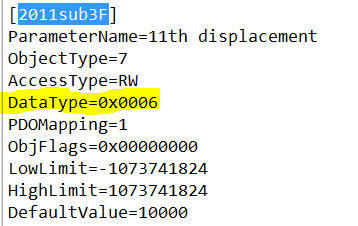
The workaround for now is to set the Datatype=0x0006 [unsigned16] (previous value is 0x0005 [unsigned8]) in object [2011sub3F] and then you can import the CanOpen EDS without error.
Schneider Electric USA

Explore more
Range:
Users group

Discuss this topic with experts

Visit our community and get advice from experts and peers on this topic and more
Explore more
Range:

Need help?

Need help?

Product Selector

Product Selector

Quickly and easily find the right products and accessories for your applications.

Get a Quote

Get a Quote

Start your sales inquiry online and an expert will connect with you.

Where to buy?

Where to buy?

Easily find the nearest Schneider Electric distributor in your location.

Help Center

Help Center

Find support resources for all your needs, in one place.

  • Help and Contact Center
  • Contact Sales
  • Find our Offices
  • Where to Buy
  • Tech Support: 877-342-5173
  • Careers
  • Company Profile
  • Investors
  • Newsroom
  • Report a Misconduct
  • Product Documentation
  • Software and Firmware
  • Product Selector
  • Product Replacement
  • DigestPLUS Online Catalogue
  • Blog
  • Events
  • Schneider Electric Community
  • Sustainability
  • Privacy Policy
  • Cookie Notice
  • Terms of use
  • Change your cookie settings