


In SoMachine or EcoStruxure Machine Expert, how do I change the PLC or Magelis/Harmony HMI type?
Issue
In SoMachine or EcoStruxure Machine Expert, how do I change the PLC or Magelis/Harmony HMI type?
Product Line
SoMachine / EcoStruxure Machine Expert
M238, M258, M241, M251, M262, HMISCU/STU, XBTGC, XBTGT/GK, HMIGTO/GTU
Environment
PLC Configuration Software in Windows
Resolution
From the Devices Tree,
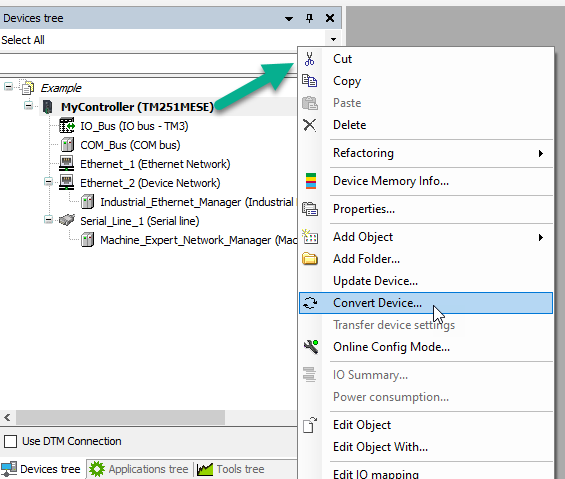
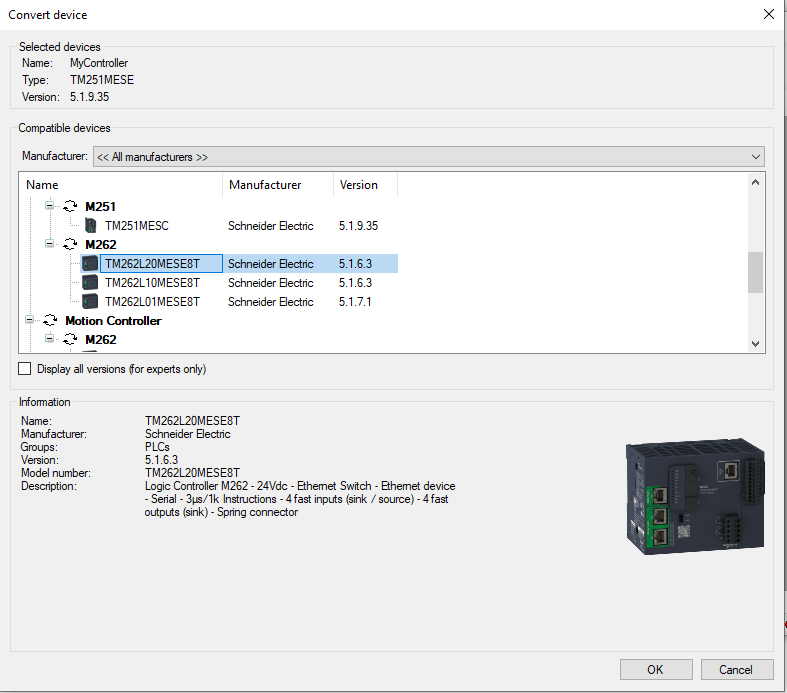
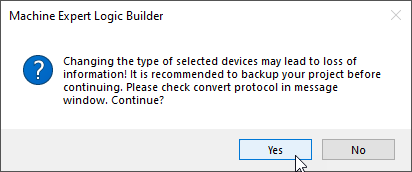
Right-click on the controller or HMI and select "convert device" then select the controller you want to change it to.
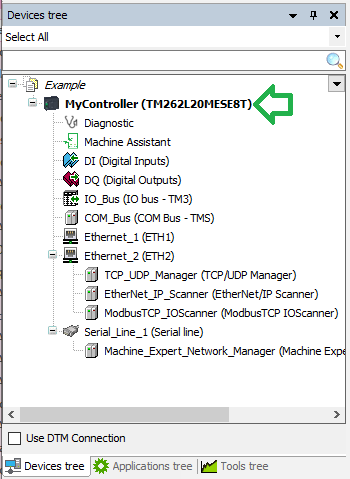
As a result, you will see the Device type has changed:
In SoMachine or EcoStruxure Machine Expert, how do I change the PLC or Magelis/Harmony HMI type?
Product Line
SoMachine / EcoStruxure Machine Expert
M238, M258, M241, M251, M262, HMISCU/STU, XBTGC, XBTGT/GK, HMIGTO/GTU
Environment
PLC Configuration Software in Windows
Resolution
From the Devices Tree,
Right-click on the controller or HMI and select "convert device" then select the controller you want to change it to.
As a result, you will see the Device type has changed: