


Hôm nay chúng tôi có thể giúp gì cho bạn?
Is it possible to read Somachine PLC_R structure tag from the Magelis HMI?
In SoMachine and EcoStruxure Machine Expert, it is possible to read PLC_R directly from an HMI programmed with Vijeo Designer.
Steps:
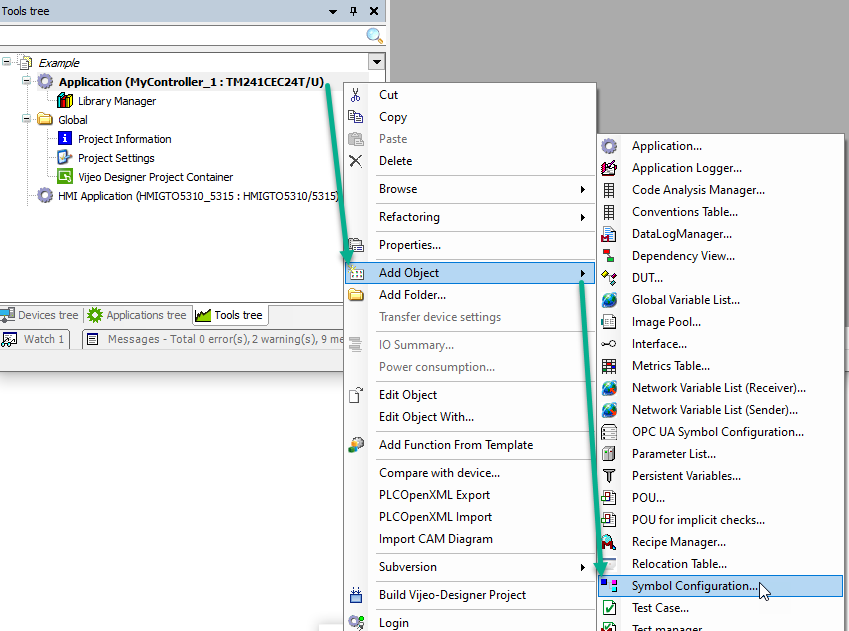
1) Add the Symbol Configuration Node from the Tools tree to your PLC:
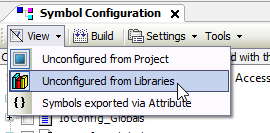
2) In the menu bar of the Symbol Configuration pane, activate "Unconfigured from Libraries"
3) Click Build.

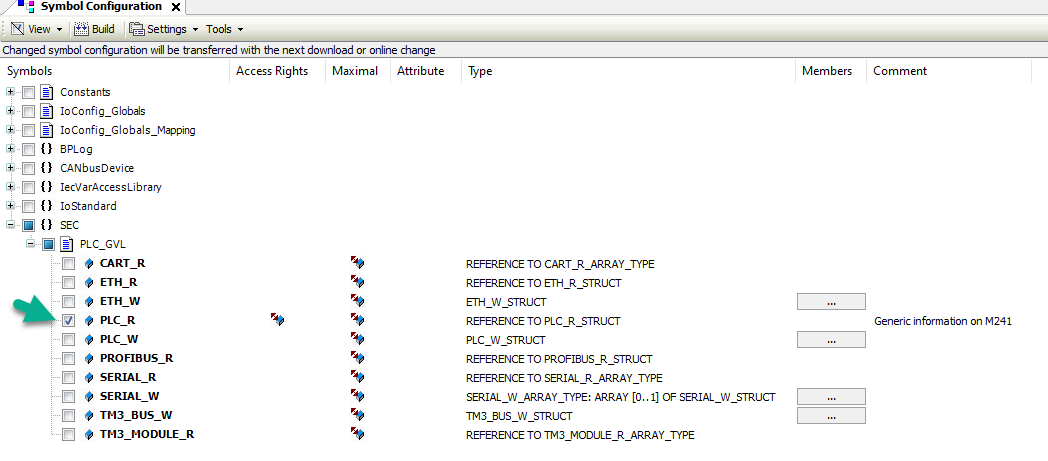
4)From Symbol configuration, expand the SEC -> PLC_GVL -> PLC_R and place a tickmark next to PLC_R:
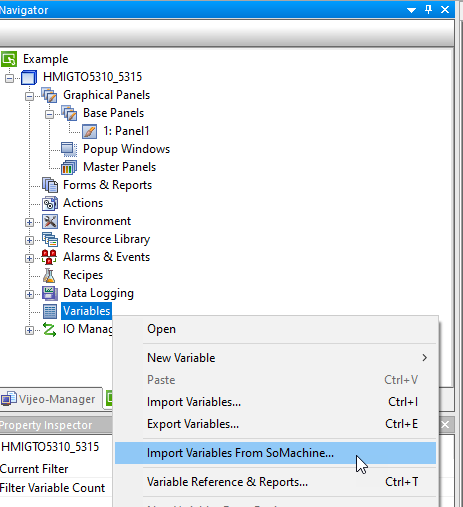
4) In Vijeo Designer, right-click on the Variables node and select "Import Variables From SoMachine..."
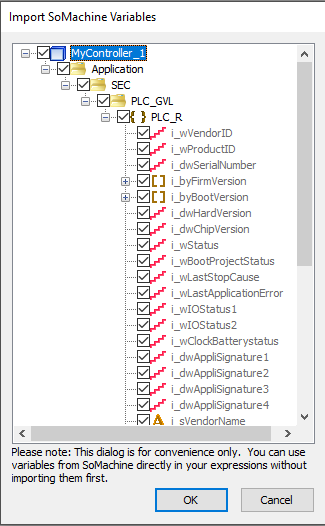
5) In the "Import SoMachine Variables" dialog, expand the nodes and choose the specific variables you want to use in Vijeo Designer:
NOTE:
1) PLC_R.ilwSystemFault_1 and PLC_R.ilwSystemFault_2 variables will not be imported into Vijeo Designer because they are LONG WORDs (64-bit datatypes) - which are not supported by Vijeo Designer
2) Enumerated types that have Strings associated with them from the PLC will only appear as the Integer Value in Vijeo Designer. So you will have to look up the value's context from the manual when seen on the screen.
Steps:
1) Add the Symbol Configuration Node from the Tools tree to your PLC:
2) In the menu bar of the Symbol Configuration pane, activate "Unconfigured from Libraries"
3) Click Build.
4)From Symbol configuration, expand the SEC -> PLC_GVL -> PLC_R and place a tickmark next to PLC_R:
4) In Vijeo Designer, right-click on the Variables node and select "Import Variables From SoMachine..."
5) In the "Import SoMachine Variables" dialog, expand the nodes and choose the specific variables you want to use in Vijeo Designer:
NOTE:
1) PLC_R.ilwSystemFault_1 and PLC_R.ilwSystemFault_2 variables will not be imported into Vijeo Designer because they are LONG WORDs (64-bit datatypes) - which are not supported by Vijeo Designer
2) Enumerated types that have Strings associated with them from the PLC will only appear as the Integer Value in Vijeo Designer. So you will have to look up the value's context from the manual when seen on the screen.
Đã phát hành cho: Schneider Electric Việt Nam
Phần đính kèm
Tìm hiểu thêm
Phạm vi:
Tìm hiểu thêm
Phạm vi:
Bạn cần trợ giúp?
Công cụ chọn sản phẩm
Nhanh chóng và dễ dàng tìm được sản phẩm và phụ kiện phù hợp cho các ứng dụng của bạn.
Nhận báo giá
Bắt đầu gửi yêu cầu bán hàng trực tuyến và chuyên gia sẽ liên hệ với bạn.
Nơi mua hàng?
Dễ dàng tìm nhà phân phối Schneider Electric gần bạn nhất.
Trung tâm Hỗ trợ
Tìm sự hỗ trợ cho mọi nhu cầu của bạn tại một nơi.