


Hôm nay chúng tôi có thể giúp gì cho bạn?
How to create an access point with HMIBMO/BMI + HMIYMINWIFI2?
Issue
Since the feature Access Point is supported by Windows 10, the function Hosted network is not anymore available in the wifi card HMIYMINWIFI2
But the Windows feature allow the access point only if there is internet connection activated. In some cases, It is not possible to have, this FAQ explain how to create an access point without internet
Product line
HMIBMx / HMIYMINWIFI2
Environment
Windows 10 IIoT
Resolution
You have two possibilities to set an access point using Windows 10:
If you have internet connection
In this case, the access point is natively in Windows 10
Setting / Network &Internet / Mobile hotspot
If you don’t have internet connection
In this case you cannot use the native function of Windows 10
One application is available on the Windows store for free. This application offer the possibility to create an access point without internet connection
Before install Microsoft store, you need to start the windows update service.
Go to: Control Panel / Administrative tools / Services / and Start the service "Windows update"
Connect internet
Go to Setting / Update & Security / Check for update (and install it)
Download and install Microsoft Store for Win LTSB => https://github.com/kkkgo/LTSB-Add-MicrosoftStore
Search the app "HotSpot Lite" "Wifi HotSpot (Soft AP)" or and install
You can disconnect internet (no need anymore internet)
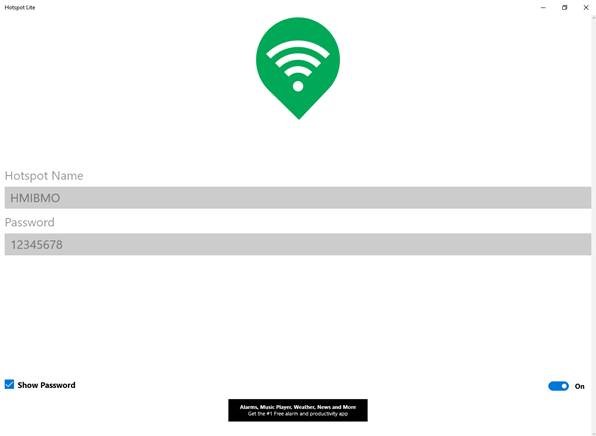
Launch HotSpot, define and name and password and click on "ON"
Since the feature Access Point is supported by Windows 10, the function Hosted network is not anymore available in the wifi card HMIYMINWIFI2
But the Windows feature allow the access point only if there is internet connection activated. In some cases, It is not possible to have, this FAQ explain how to create an access point without internet
Product line
HMIBMx / HMIYMINWIFI2
Environment
Windows 10 IIoT
Resolution
You have two possibilities to set an access point using Windows 10:
If you have internet connection
In this case, the access point is natively in Windows 10
Setting / Network &Internet / Mobile hotspot
If you don’t have internet connection
In this case you cannot use the native function of Windows 10
One application is available on the Windows store for free. This application offer the possibility to create an access point without internet connection
Before install Microsoft store, you need to start the windows update service.
Go to: Control Panel / Administrative tools / Services / and Start the service "Windows update"
Connect internet
Go to Setting / Update & Security / Check for update (and install it)
Download and install Microsoft Store for Win LTSB => https://github.com/kkkgo/LTSB-Add-MicrosoftStore
Search the app "HotSpot Lite" "Wifi HotSpot (Soft AP)" or and install
You can disconnect internet (no need anymore internet)
Launch HotSpot, define and name and password and click on "ON"
Đã phát hành cho: Schneider Electric Việt Nam
Tìm hiểu thêm
Phạm vi:
Tìm hiểu thêm
Phạm vi:
Bạn cần trợ giúp?
Công cụ chọn sản phẩm
Nhanh chóng và dễ dàng tìm được sản phẩm và phụ kiện phù hợp cho các ứng dụng của bạn.
Nhận báo giá
Bắt đầu gửi yêu cầu bán hàng trực tuyến và chuyên gia sẽ liên hệ với bạn.
Nơi mua hàng?
Dễ dàng tìm nhà phân phối Schneider Electric gần bạn nhất.
Trung tâm Hỗ trợ
Tìm sự hỗ trợ cho mọi nhu cầu của bạn tại một nơi.