


How to sync the alarm status in two HMIs
How to sync the alarm status (Active,Acknowledge,,Gone) in two HMI Targets.
Vijeo Designer 6.2 [SPx].
User can use Data Sharing and RemoteCategory to sync the alarm status in different HMI Targets. Here is an example.
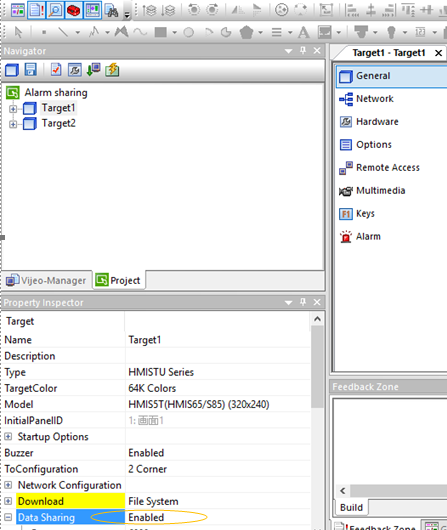
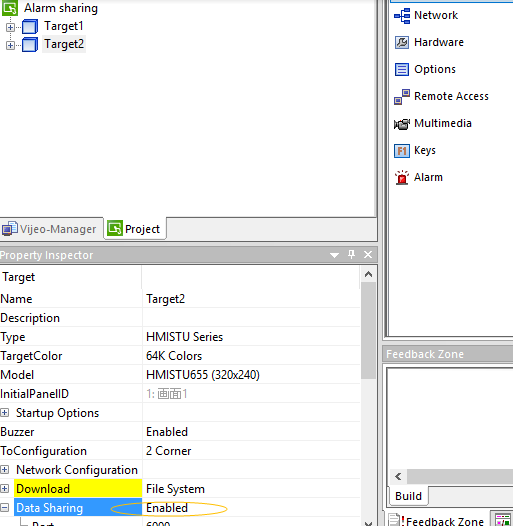
Step 1. Add 2 Targets in VJD project and enable Data Sharing.
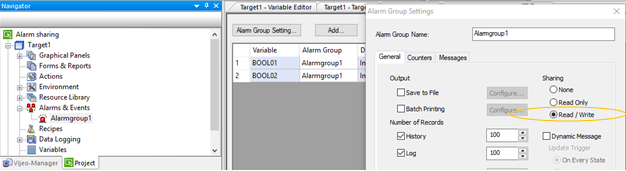
Step 2.In Target1,create an Alarmgroup and select Read/Write in the setting.
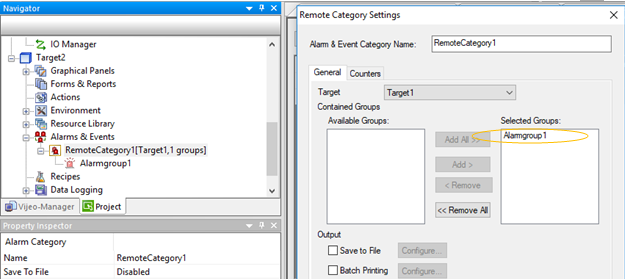
Step 3.In Target2,create a RemoteCategory and select Alarmgroup1 in the setting.
Step 4.Add Alarm Summary in Graphical Panel in Target1,select Alarmgroup1 in Alarm Summary Settings.
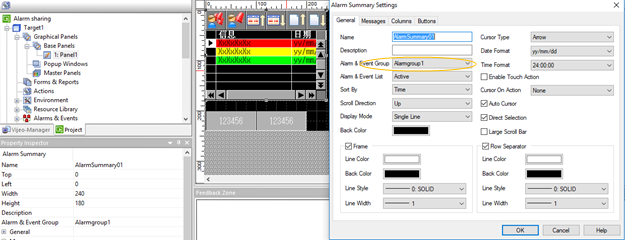
Step 5.Add Alarm Summary in Graphical Panel in Target2,select RemoteCategory1 in Alarm Summary Settings.
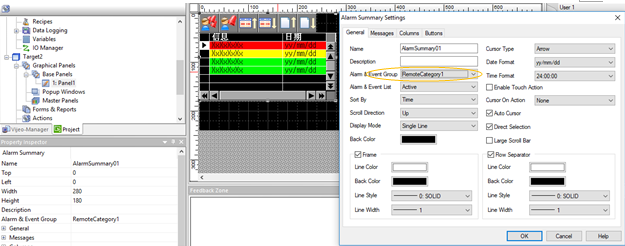
Step 6. Download Projects to HMI Targets, loop HMI Targets in the same network, user will get the same alarm status (Active,acknowledge,,gone) in both of these 2 HMI Targets.
FAQ applies to all Vijeo Designer 6.2 SPx.
Vijeo Designer 6.2 [SPx].
User can use Data Sharing and RemoteCategory to sync the alarm status in different HMI Targets. Here is an example.
Step 1. Add 2 Targets in VJD project and enable Data Sharing.
Step 2.In Target1,create an Alarmgroup and select Read/Write in the setting.
Step 3.In Target2,create a RemoteCategory and select Alarmgroup1 in the setting.
Step 4.Add Alarm Summary in Graphical Panel in Target1,select Alarmgroup1 in Alarm Summary Settings.
Step 5.Add Alarm Summary in Graphical Panel in Target2,select RemoteCategory1 in Alarm Summary Settings.
Step 6. Download Projects to HMI Targets, loop HMI Targets in the same network, user will get the same alarm status (Active,acknowledge,,gone) in both of these 2 HMI Targets.
FAQ applies to all Vijeo Designer 6.2 SPx.