


Hôm nay chúng tôi có thể giúp gì cho bạn?
PME - Power Quality Report returns no data when run against an archive database
Issue
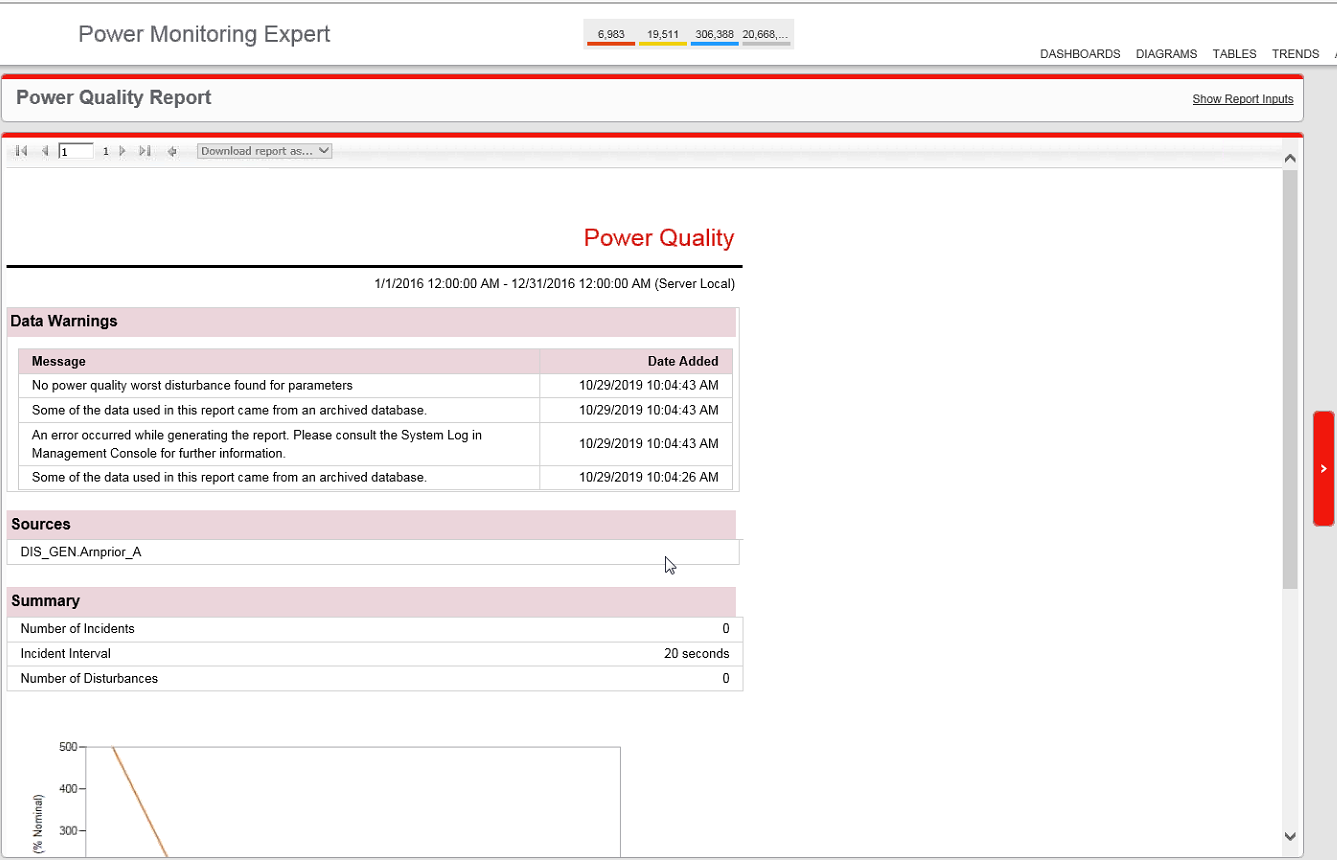
When running a Power Quality Report in PME version 8.2 and up, no data is returned despite there being known power quality events logged in the database. The System Log Events in Management Console shows an error such as "Failed to update database "ION_Data_Archive" because the database is read-only."
Product Line
Power Monitoring Expert 7.2.x
Power Monitoring Expert 8.0
Power Monitoring Expert 9.0
Power Monitoring Expert 2020
Power Monitoring Expert 2021
Power Monitoring Expert 2022
Power Monitoring Expert 2023
Environment
Web Applications Reports
Cause
The Power Quality Report is unable to populate data when querying an ION_Data archive that is set to Read-Only.
Resolution
*Warning: Irreparable database damage can occur. This procedure should only be performed by
users familiar with SQL Server Management Studio. Databases should be backed up prior to
performing this procedure.*
The ION_Data archive must be set to Read-Write.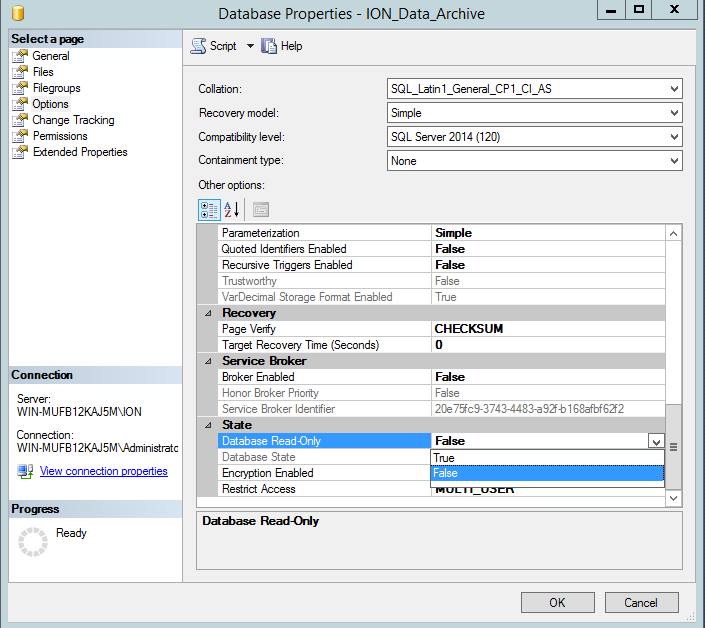
When running a Power Quality Report in PME version 8.2 and up, no data is returned despite there being known power quality events logged in the database. The System Log Events in Management Console shows an error such as "Failed to update database "ION_Data_Archive" because the database is read-only."
Product Line
Power Monitoring Expert 7.2.x
Power Monitoring Expert 8.0
Power Monitoring Expert 9.0
Power Monitoring Expert 2020
Power Monitoring Expert 2021
Power Monitoring Expert 2022
Power Monitoring Expert 2023
Environment
Web Applications Reports
Cause
The Power Quality Report is unable to populate data when querying an ION_Data archive that is set to Read-Only.
Resolution
*Warning: Irreparable database damage can occur. This procedure should only be performed by
users familiar with SQL Server Management Studio. Databases should be backed up prior to
performing this procedure.*
The ION_Data archive must be set to Read-Write.
- Open SQL Server Management Studio (SSMS), then connect to the PME database instance (default is ION)
- Expand Databases, then Right-Click the ION_Data archive database
- Select Properties > Options
- Scroll to the bottom of the list where it says 'State', then change 'Database Read-Only' to 'False'.
Đã phát hành cho: Schneider Electric Việt Nam
Tìm hiểu thêm
Phạm vi:
Tìm hiểu thêm
Phạm vi:
Bạn cần trợ giúp?
Công cụ chọn sản phẩm
Nhanh chóng và dễ dàng tìm được sản phẩm và phụ kiện phù hợp cho các ứng dụng của bạn.
Nhận báo giá
Bắt đầu gửi yêu cầu bán hàng trực tuyến và chuyên gia sẽ liên hệ với bạn.
Nơi mua hàng?
Dễ dàng tìm nhà phân phối Schneider Electric gần bạn nhất.
Trung tâm Hỗ trợ
Tìm sự hỗ trợ cho mọi nhu cầu của bạn tại một nơi.