


Control Expert 15 returns error 'mfc140u.dll is missing' when starting
Control Expert returns the error 'system error: mfc140u.dll is missing' when trying to start.
This error will occur if the mfc140u.dll file already exists on the PC and it is of a newer version when Control Expert is installed. The 'mfc140u.dll' file is part of the 'Microsoft Visual C++ 20xx Redistributable ' libraries that gets installed during the Control Expert installation process. Per Microsoft rules, a software installation is not allowed to overwrite an existing version of a Microsoft '.dll' with an older version. This rule prevented the
proper installation of the required 'Microsoft Visual C++ 20xx Redistributable ' libraries.
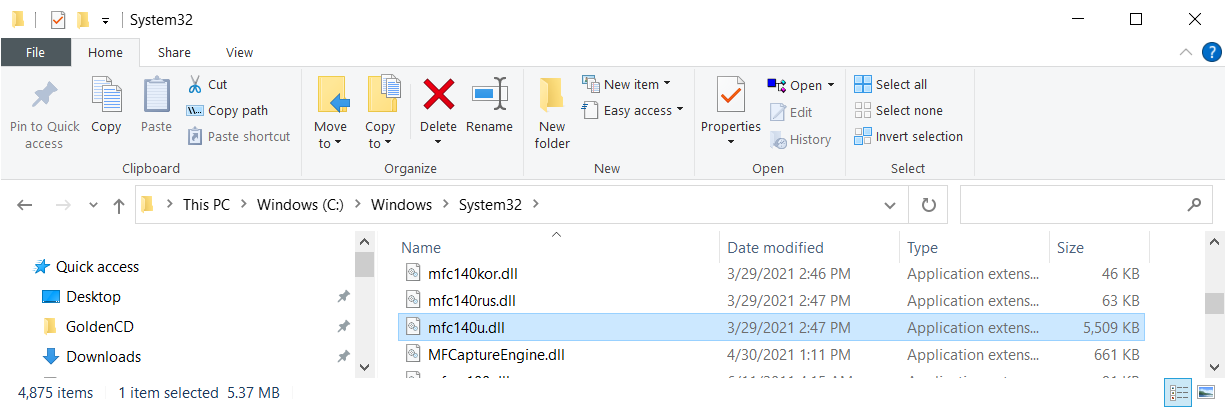
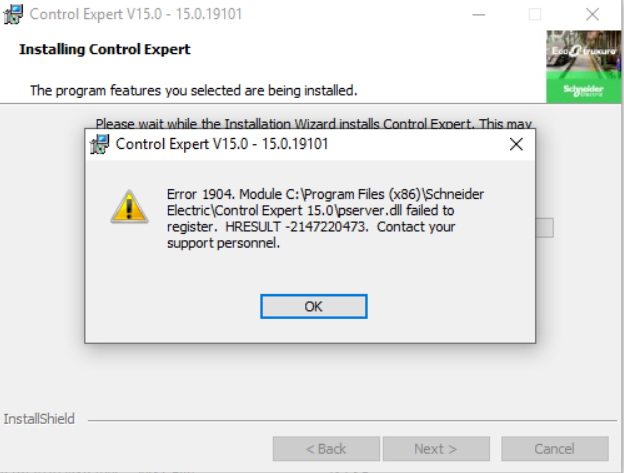
The specific version 'mfc140u.dll' file is essential for the registration of other '.dll's that are included with Control Expert. As a result of this, the error could also be accompanied with the following error:
To resolve the issue,
This error will occur if the mfc140u.dll file already exists on the PC and it is of a newer version when Control Expert is installed. The 'mfc140u.dll' file is part of the 'Microsoft Visual C++ 20xx Redistributable ' libraries that gets installed during the Control Expert installation process. Per Microsoft rules, a software installation is not allowed to overwrite an existing version of a Microsoft '.dll' with an older version. This rule prevented the
proper installation of the required 'Microsoft Visual C++ 20xx Redistributable ' libraries.
The specific version 'mfc140u.dll' file is essential for the registration of other '.dll's that are included with Control Expert. As a result of this, the error could also be accompanied with the following error:
To resolve the issue,
- Rename the existing .'mfc140u.dll' file.
- Uninstall Control Expert.
- Reboot the PC.
- Reinstall Control Expert.