.svg)
Issue
Unable to start ‘ArchestrA Data Store’ service, when trying to start it manually getting below error (1069) –

In windows event log > Application
The ArchestrADataStore service failed to start due to the following error:
Logon failure: the user has not been granted the requested logon type at this computer.
Service: ArchestrADataStore
Domain and account: NT SERVICE\ArchestrADataStore
This service account does not have the required user right "Log on as a service."
User Action
Assign "Log on as a service" to the service account on this computer. You can use Local Security Settings (Secpol.msc) to do this. If this computer is a node in a cluster, check that this user right is assigned to the Cluster service account on all nodes in the cluster.
If you have already assigned this user right to the service account, and the user right appears to be removed, check with your domain administrator to find out if a Group Policy object associated with this node might be removing the right.
Above similar errors you may observe for ConnectivityService and Watchdog_Service service as well.
it is causing runtime manager to crash
Cannot connect to the runtime manager service, ensure the service has been started.
Environment
EcoStruxure Power Operation (EPO) 2021
Cause
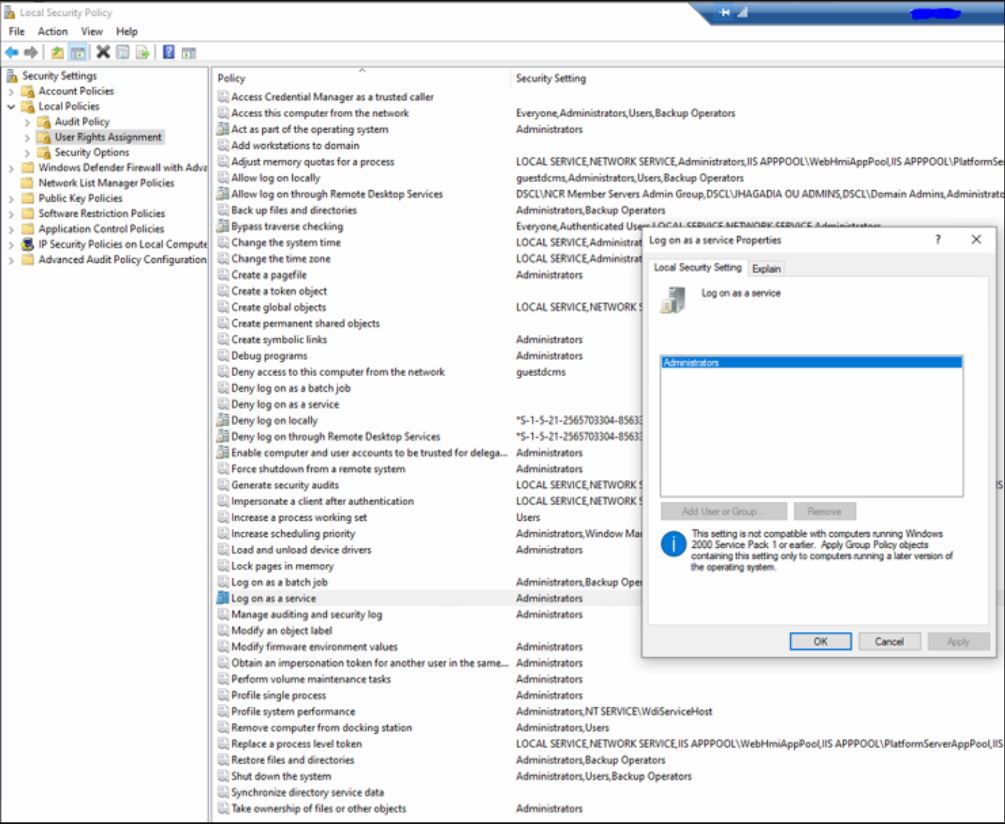
This could be due to the domain restrictions on the service logon, in below screen-cap you may observe that the windows log on as a service is allowed only to the Administrators. But most of the EPO windows services are running under the service accounts.
Resolution
To fix the same, as per Microsoft article we need to add below list of users to 'Enable service log on through a local group policy’
IIS APPPOLL\.NET v4.5
IIS APPPOLL\.NET v4.5 Clasic
IIS APPPOLL\DefaultAppPoll
IIS APPPOLL\PlatformServerAppPoll
IIS APPPOLL\PsoWebServiceAppPoll
IIS APPPOLL\WebHmiAppPoll
NT SERVICE\AIMTokenHost
NT SERVICE\ALL SERVICES
NT SERVICE\ArchestrADataStore
NT SERVICE\AsbServiceManager
NT SERVICE\Watchdog_Service

After applying fix, try rebooting the machine multiple times to ensure domain group policy is not impacting above configuration (make sure all above service users have right access).
Unable to start ‘ArchestrA Data Store’ service, when trying to start it manually getting below error (1069) –
In windows event log > Application
The ArchestrADataStore service failed to start due to the following error:
The service did not start due to a logon failure.
The ArchestrADataStore service was unable to log on as NT SERVICE\ArchestrADataStore with the currently configured password due to the following error: Logon failure: the user has not been granted the requested logon type at this computer.
Service: ArchestrADataStore
Domain and account: NT SERVICE\ArchestrADataStore
This service account does not have the required user right "Log on as a service."
User Action
Assign "Log on as a service" to the service account on this computer. You can use Local Security Settings (Secpol.msc) to do this. If this computer is a node in a cluster, check that this user right is assigned to the Cluster service account on all nodes in the cluster.
If you have already assigned this user right to the service account, and the user right appears to be removed, check with your domain administrator to find out if a Group Policy object associated with this node might be removing the right.
Above similar errors you may observe for ConnectivityService and Watchdog_Service service as well.
it is causing runtime manager to crash
Cannot connect to the runtime manager service, ensure the service has been started.
Environment
EcoStruxure Power Operation (EPO) 2021
Cause
This could be due to the domain restrictions on the service logon, in below screen-cap you may observe that the windows log on as a service is allowed only to the Administrators. But most of the EPO windows services are running under the service accounts.
Resolution
To fix the same, as per Microsoft article we need to add below list of users to 'Enable service log on through a local group policy’
IIS APPPOLL\.NET v4.5
IIS APPPOLL\.NET v4.5 Clasic
IIS APPPOLL\DefaultAppPoll
IIS APPPOLL\PlatformServerAppPoll
IIS APPPOLL\PsoWebServiceAppPoll
IIS APPPOLL\WebHmiAppPoll
NT SERVICE\AIMTokenHost
NT SERVICE\ALL SERVICES
NT SERVICE\ArchestrADataStore
NT SERVICE\AsbServiceManager
NT SERVICE\Watchdog_Service
After applying fix, try rebooting the machine multiple times to ensure domain group policy is not impacting above configuration (make sure all above service users have right access).
