


Jak vám dnes můžeme pomoci?
How to perform a soft reset on an EGX100 or EGX300
Issue
A user would like to reboot an EGX100/EGX300 without removing control power or writing to registers on the gateway.
Product Line
EGX300
EGX100
Environment
Device Soft Reset
Cause
The EGX can be rebooted using the reset button on the front of the device.
Resolution
1) On the EGX front panel, continuously hold reset button more than 10sec.
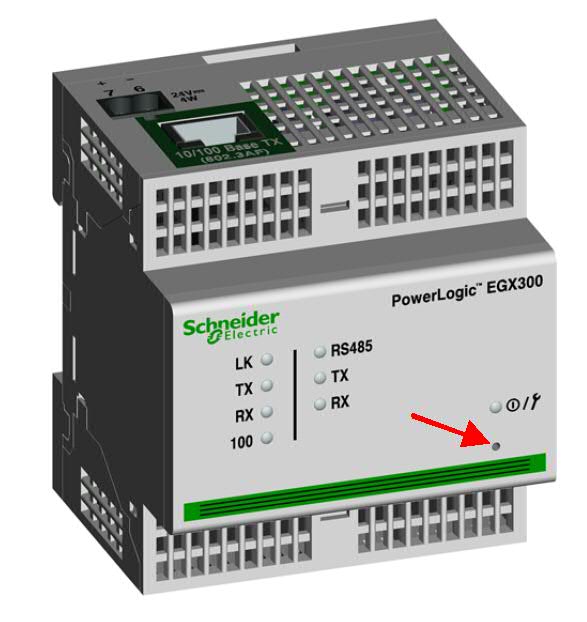
2) All of the LEDs on the EGX will flash off and then on again.
3) Once the EGX is booted back up it will have experienced a simulated power cycle. No data or device configuration will be lost.
A user would like to reboot an EGX100/EGX300 without removing control power or writing to registers on the gateway.
Product Line
EGX300
EGX100
Environment
Device Soft Reset
Cause
The EGX can be rebooted using the reset button on the front of the device.
Resolution
1) On the EGX front panel, continuously hold reset button more than 10sec.
2) All of the LEDs on the EGX will flash off and then on again.
3) Once the EGX is booted back up it will have experienced a simulated power cycle. No data or device configuration will be lost.
Publikováno pro: Schneider Electric Česká republika
Zjistěte více
Řada:
Zjistěte více
Řada:
Potřebujete pomoc?
Nástroj pro výběr produktů
Rychle a snadno vyhledávejte správné produkty a příslušenství pro vaše aplikace.
Získejte nabídku
Poptejte se nás online a náš lokální specialista se s vámi spojí!
Kde nakoupit?
Jednoduše najděte nejbližšího distributora výrobků Schneider Electric ve vašem okolí.
Centrum nápovědy
Zdroje podpory pro všechny své potřeby najdete na jednom místě.