


Чим ми можемо вам допомогти сьогодні?
Hierarchy Manager Fails to Upload Records
Issue
When changing tabs in Hierarchy Manager, the system tries to upload records. However, after a few minutes, it fails and shows the following message:
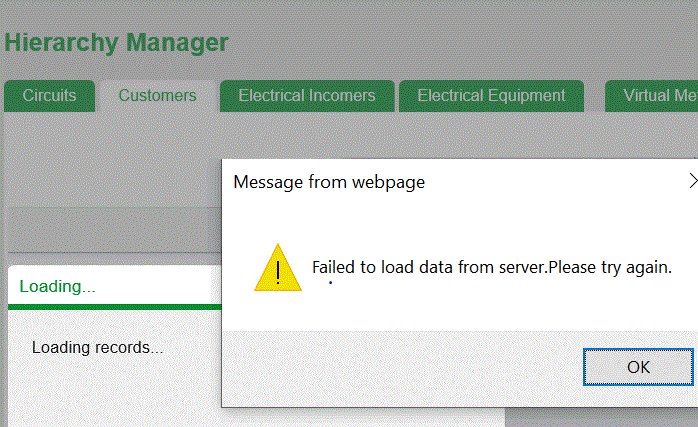
Loading records...
Failed to load data from the server. Please try again.
Product Line
Power Monitoring Expert 9.0
Environment
Hierarchy Manager
Cause
By default, the hierarchy manager has to upload records within 2 minutes. If it doesn't manage to upload within this time, it will fail.
Resolution
Change the Javascript file for HierarchyManager to increase the timeout. The file is:
...\Power Monitoring Expert\applications\HierarchyManager\Scripts\HierarchyManager\data.nodemodel.js
Find the following code snippet:
$.ajax({
type: "GET",
url: baseUrl,
timeout: 2*60*1000, // 2 minutes. Some hierarchy pages can take a long time to generate.
data: { nodeQuery: JSON.stringify(nodeQuery) },
dataType: "json",
success: onSuccess,
error: onError,
page: page
});
Change the timeout to 4*60*1000. This increases the timeout to 4 minutes.
*Note: This solution does not apply to versions of PME after PME 9.0
When changing tabs in Hierarchy Manager, the system tries to upload records. However, after a few minutes, it fails and shows the following message:
Loading records...
Failed to load data from the server. Please try again.
Product Line
Power Monitoring Expert 9.0
Environment
Hierarchy Manager
Cause
By default, the hierarchy manager has to upload records within 2 minutes. If it doesn't manage to upload within this time, it will fail.
Resolution
Change the Javascript file for HierarchyManager to increase the timeout. The file is:
...\Power Monitoring Expert\applications\HierarchyManager\Scripts\HierarchyManager\data.nodemodel.js
Find the following code snippet:
$.ajax({
type: "GET",
url: baseUrl,
timeout: 2*60*1000, // 2 minutes. Some hierarchy pages can take a long time to generate.
data: { nodeQuery: JSON.stringify(nodeQuery) },
dataType: "json",
success: onSuccess,
error: onError,
page: page
});
Change the timeout to 4*60*1000. This increases the timeout to 4 minutes.
*Note: This solution does not apply to versions of PME after PME 9.0
Опубліковано для: Schneider Electric Україна
Досліджуйте більше
Серія:
Досліджуйте більше
Серія:
Потрібна допомога?
Почніть тут!
Знайдіть відповіді зараз. Шукайте рішення самостійно або зверніться до нашого експерта.
Звернутися до служби підтримки
Якщо вам потрібна допомога, додаткова інформація чи технічна підтримка або ви хочете подати скаргу, зв’яжіться з нашою командою з обслуговування клієнтів.
Де придбати?
Зручний пошук найближчого дистриб’ютора, магазина або спеціалізованого партнера Schneider Electric у вашому регіоні.
Переглянути відповіді на поширені запитання
Отримайте необхідну інформацію, переглянувши відповіді на поширені запитання за відповідними темами.