


How to recover diagnostic information with the Diagnostic DDT on a redundant power supply?
Please, refer to this procedure to recover logs available in the redundant power supplies BMXCPS4002(S), BMXCPS3522(S), or BMXCPS4022(S). Other references have no such diagnostics available.
1 – You should have a redundant power supply connected in a redundant configuration with a power supply in master mode and the other power supply in slave mode.

2 – Install the DDT “PWS_CMD_DDT” and “PWS_DIAG_DDT” (if not installed) downloadable here:
https://www.se.com/us/en/download/document/CPS_RED_PREDICT_MAINT_LIB_1.06/

3 – Connect to the processor with Control-Expert
4 – Create variables to use the DDT for the “Diagnostic” and the DDT for the “Command”.
7 – Attach in the case the screenshot of the animation table previously set
1 – You should have a redundant power supply connected in a redundant configuration with a power supply in master mode and the other power supply in slave mode.
2 – Install the DDT “PWS_CMD_DDT” and “PWS_DIAG_DDT” (if not installed) downloadable here:
https://www.se.com/us/en/download/document/CPS_RED_PREDICT_MAINT_LIB_1.06/
3 – Connect to the processor with Control-Expert
4 – Create variables to use the DDT for the “Diagnostic” and the DDT for the “Command”.
- One variable for the command which is “PWS_CMD_DDT” type
- Two variables for the two power supplies one for the master power supply and one for the slave
power supply. Both variables are typed “PWS_DIAG_DDT”.

- Two variables for the two power supplies one for the master power supply and one for the slave
power supply. Both variables are typed “PWS_DIAG_DDT”.
5 – Create an animation table and add the three variables within
How to create an animation table:
How to create an animation table:
Right click on the first variable that you want put in the animation table
Initialize a new animation table (if the animation table doesn’t exist)
Initialize an animation table (if the animation table exists yet)
Initialize a new animation table (if the animation table doesn’t exist)
Initialize an animation table (if the animation table exists yet)
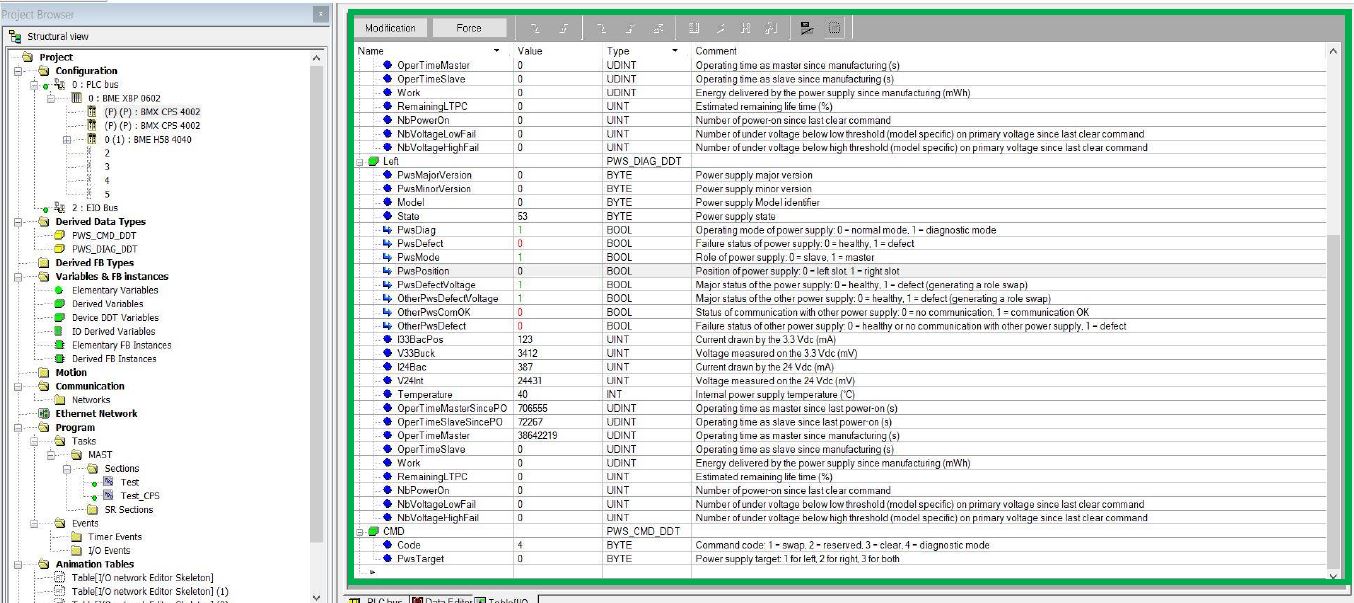
6 – Open your animation table and parameter the two power supplies :
Choose the position of the Power supply: Left / Right
Choose the state of the Power Supply: Master / Slave
Check values variations
Choose the state of the Power Supply: Master / Slave
Check values variations
7 – Attach in the case the screenshot of the animation table previously set
Опубліковано для: Schneider Electric Україна
Потрібна допомога?
Почніть тут!
Знайдіть відповіді зараз. Шукайте рішення самостійно або зверніться до нашого експерта.
Звернутися до служби підтримки
Якщо вам потрібна допомога, додаткова інформація чи технічна підтримка або ви хочете подати скаргу, зв’яжіться з нашою командою з обслуговування клієнтів.
Де придбати?
Зручний пошук найближчого дистриб’ютора, магазина або спеціалізованого партнера Schneider Electric у вашому регіоні.
Переглянути відповіді на поширені запитання
Отримайте необхідну інформацію, переглянувши відповіді на поширені запитання за відповідними темами.