


Why OFS 3.63 SP3 has some start-up latency or doesn’t start?
The OFS 3.63 SP3 has integrated some CRLs access from Internet.
However, in certain condition of used, OFS can be installed on a computer where no internet connection is available.
Therefor, OFS won’t start or start with a long period of wait.
To avoid this, the proposed workaround is to bypass this step of the online CRLs access by modifying a registry key.
To do it, the value of the following registry need to be modified either using the “SetReg” tool proposed by Microsoft or manually by accessing to the registry.
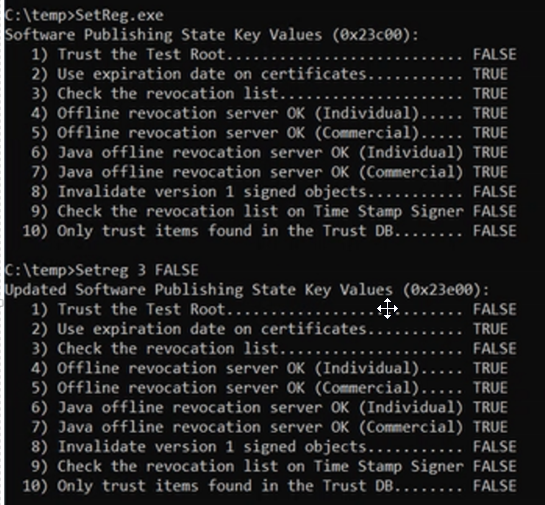
The SetReg tool give the following information:
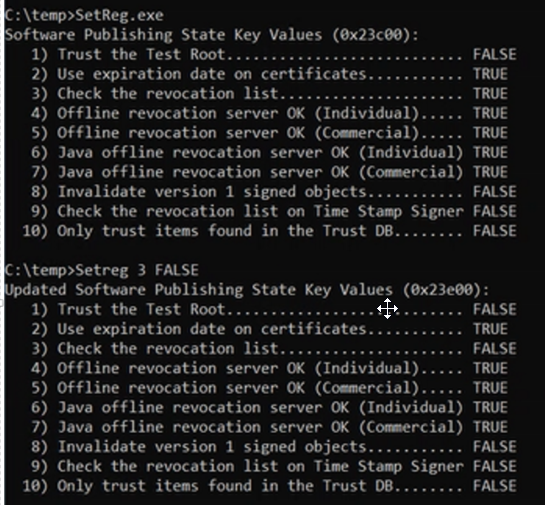
The parameter 3) need to be changed from TRUE to FALSE as followed by executing the following command : SetReg 3 FALSE
KEY_CURRENT_USER\SOFTWARE\Microsoft\Windows\CurrentVersion\WinTrust\Trust Providers\Software Publishing
This is the Key registry for the current user. If your OFS is launched by a specific user, please do the same on this specific user registry key.

This issue will be corrected in the next release of OFS. OFS 3.63 SP3 Windows 10, Windows Server 2022
However, in certain condition of used, OFS can be installed on a computer where no internet connection is available.
Therefor, OFS won’t start or start with a long period of wait.
To avoid this, the proposed workaround is to bypass this step of the online CRLs access by modifying a registry key.
To do it, the value of the following registry need to be modified either using the “SetReg” tool proposed by Microsoft or manually by accessing to the registry.
- Using SetReg by Microsoft:
The SetReg tool give the following information:
The parameter 3) need to be changed from TRUE to FALSE as followed by executing the following command : SetReg 3 FALSE
- Modifying the registry key manually:
KEY_CURRENT_USER\SOFTWARE\Microsoft\Windows\CurrentVersion\WinTrust\Trust Providers\Software Publishing
This is the Key registry for the current user. If your OFS is launched by a specific user, please do the same on this specific user registry key.
| State value | SetReg command | Effect |
| 0x00023e00 | SetReg 3 FALSE | Disable CRLs online access |
| 0x00023c00 (default) | SetReg 3 TRUE | Enable CRLs online access |
This issue will be corrected in the next release of OFS. OFS 3.63 SP3 Windows 10, Windows Server 2022