


How to disable FTP on an EGX300 gateway
Issue
A user would like to disable the internal FTP server on an EGX300 gateway.
Product Line
EGX300
Environment
EGX300 as an FTP Server
Cause
A user may need to disable FTP on TCP port 21 due to security requirements.
Resolution
1. Login to the EGX300 webpage by entering the EGX300 IP address into a browser address bar.
3. Click on the Ethernet & TCP/IP option

4. Click on Advanced
5 Select Disable on FTP server drop down
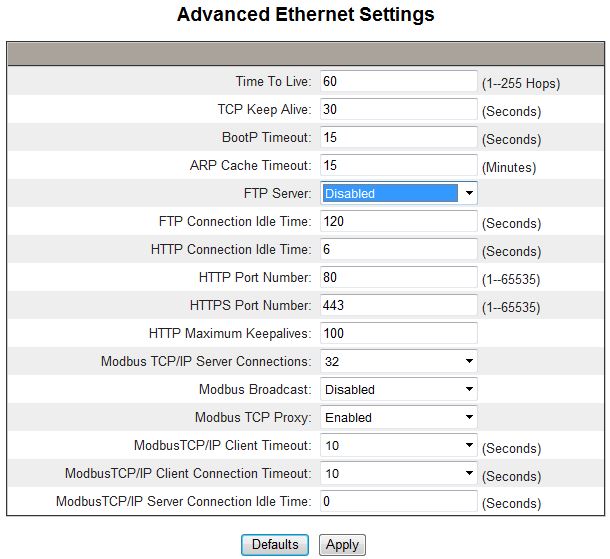
6. Click Apply
The EGX300 internal FTP server is now disabled.
A user would like to disable the internal FTP server on an EGX300 gateway.
Product Line
EGX300
Environment
EGX300 as an FTP Server
Cause
A user may need to disable FTP on TCP port 21 due to security requirements.
Resolution
1. Login to the EGX300 webpage by entering the EGX300 IP address into a browser address bar.
- The default login credentials:
- Username: Administrator
- Password: Gateway
3. Click on the Ethernet & TCP/IP option
4. Click on Advanced
5 Select Disable on FTP server drop down
6. Click Apply
The EGX300 internal FTP server is now disabled.