


Hôm nay chúng tôi có thể giúp gì cho bạn?
EGX200/EGX400 is not saving or updating the device list
Issue
The device list doesn't get updated or saved even though the input syntax is correct. Furthermore, the device list will reset all the fields to back to blank even though the devicelist.xml has been previously populated.
Product line
EGX200/EGX400
Environment
Internet Explorer version 8/9/10/11
Resolution
This issue can be resolved by adding the EGX200/400's Ip address to the Internet explorer's Compatibility view as shown below :
to access compatibility settings :
1- click the Tools button and then tap or click Compatibility View settings.
2- Under Add this website, enter the IP address of the EGX200/400 and click Add.
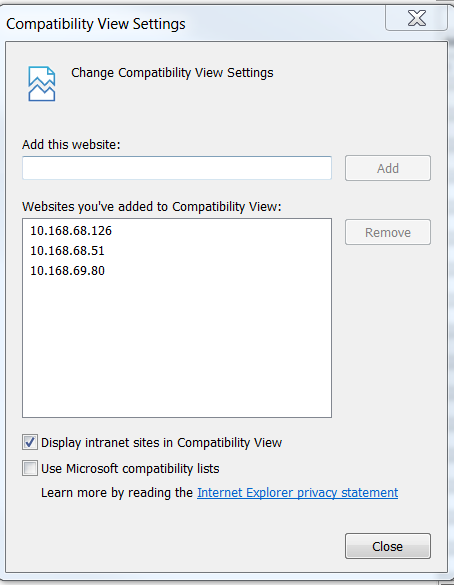
Once the Ip address has been added in the list above, Internet explorer will refresh the page and apply the compatibility view to the EGX's webpages.
Verify that the device list can be updated/altered.
The device list doesn't get updated or saved even though the input syntax is correct. Furthermore, the device list will reset all the fields to back to blank even though the devicelist.xml has been previously populated.
Product line
EGX200/EGX400
Environment
Internet Explorer version 8/9/10/11
Resolution
This issue can be resolved by adding the EGX200/400's Ip address to the Internet explorer's Compatibility view as shown below :
to access compatibility settings :
1- click the Tools button and then tap or click Compatibility View settings.
2- Under Add this website, enter the IP address of the EGX200/400 and click Add.
Once the Ip address has been added in the list above, Internet explorer will refresh the page and apply the compatibility view to the EGX's webpages.
Verify that the device list can be updated/altered.
Đã phát hành cho: Schneider Electric Việt Nam
Tìm hiểu thêm
Phạm vi:
Tìm hiểu thêm
Phạm vi:
Bạn cần trợ giúp?
Công cụ chọn sản phẩm
Nhanh chóng và dễ dàng tìm được sản phẩm và phụ kiện phù hợp cho các ứng dụng của bạn.
Nhận báo giá
Bắt đầu gửi yêu cầu bán hàng trực tuyến và chuyên gia sẽ liên hệ với bạn.
Nơi mua hàng?
Dễ dàng tìm nhà phân phối Schneider Electric gần bạn nhất.
Trung tâm Hỗ trợ
Tìm sự hỗ trợ cho mọi nhu cầu của bạn tại một nơi.