


How to set DBSnapshot log files for performance analysis
Sometimes it is necessary to troubleshoot an application that seems to be consuming too many resources, eventually impacting the Server performance. Together with the Server DB files, a good set of DBSnapshot log files help with performance analysis.
It is usually necessary to set the DBSnapshot files to be generated more frequently and store information for longer time than the default configuration. Also, resetting the counters when a new snapshot is taken helps the troubleshooting process. This article will show how to set the DBSnapshot log files generation properly, but please note that the exact numbers used may vary depending on each situation.
Depending on the GSE version, the user is able to set most of the DBSnapshot properties from the Server Configuration tool. Other versions need some registry keys to be modified. This article will cover both scenarios.
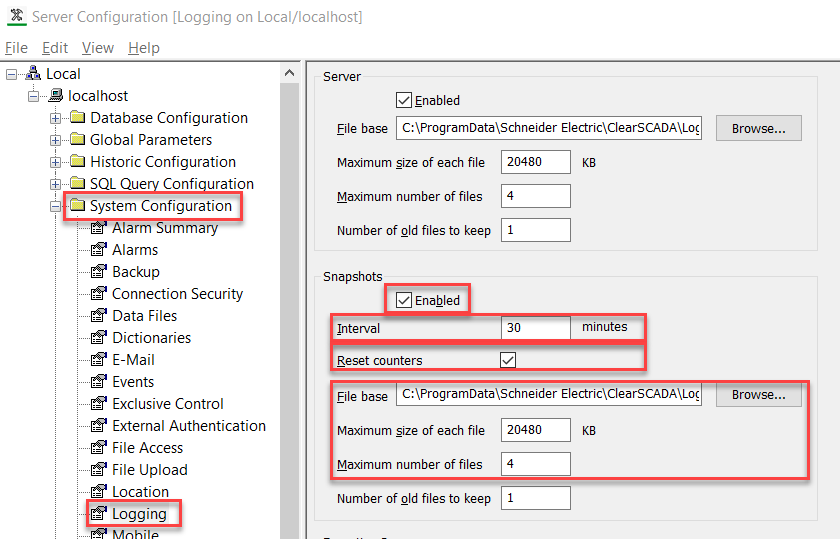
When the following options are available from the Server Configuration tool > System Configuration > Logging page, the end user can configure the Lock counters to reset after each snapshot, the interval between each snapshot, the location, size and number of files, all from that page:
When the options are not available in the Server Configuration tool > System Configuration > Logging, the end user can still set the same properties directly in registry keys, like shown below:
Resetting the counters
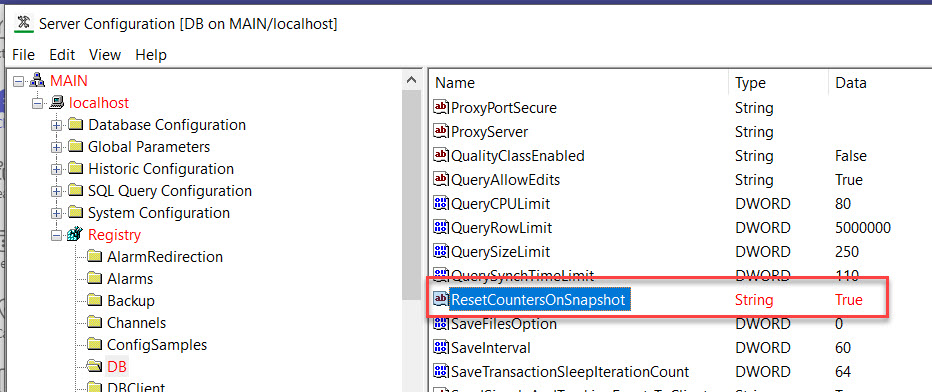
On Server Configuration tool > Registry > DB, set "ResetCounterOnSnapshot" to "True":
Setting the SnapshotInterval
On Server Configuration tool > Registry > DB, set "SnapshotInterval" to 15, for example (default is 30). The value is in minutes:

Setting LogMaxFiles, LogMaxSize
On Server Configuration > Registry > DBSnapshot, set "LogMaxFiles" to, for example, 40, "LogMaxSize" to, for example, 10200 (note that the "LogFileBase" property will show you where the files are located and their names, "DBSnapshot_nnn.log", where "nnn" is a number):

Apply changes:

It is usually necessary to set the DBSnapshot files to be generated more frequently and store information for longer time than the default configuration. Also, resetting the counters when a new snapshot is taken helps the troubleshooting process. This article will show how to set the DBSnapshot log files generation properly, but please note that the exact numbers used may vary depending on each situation.
Depending on the GSE version, the user is able to set most of the DBSnapshot properties from the Server Configuration tool. Other versions need some registry keys to be modified. This article will cover both scenarios.
When the following options are available from the Server Configuration tool > System Configuration > Logging page, the end user can configure the Lock counters to reset after each snapshot, the interval between each snapshot, the location, size and number of files, all from that page:
When the options are not available in the Server Configuration tool > System Configuration > Logging, the end user can still set the same properties directly in registry keys, like shown below:
Resetting the counters
On Server Configuration tool > Registry > DB, set "ResetCounterOnSnapshot" to "True":
Setting the SnapshotInterval
On Server Configuration tool > Registry > DB, set "SnapshotInterval" to 15, for example (default is 30). The value is in minutes:
Setting LogMaxFiles, LogMaxSize
On Server Configuration > Registry > DBSnapshot, set "LogMaxFiles" to, for example, 40, "LogMaxSize" to, for example, 10200 (note that the "LogFileBase" property will show you where the files are located and their names, "DBSnapshot_nnn.log", where "nnn" is a number):
Apply changes: