


Ecostruxure Process Expert[2021]: How to configure Peer to Peer Communication using Wizard
This document explains on How to configure Peer to Peer Communication using Wizard in Ecostruxure Process Expert 2021.
Pre-requisites:
1. Controllers must have minimum firmware version, V3.20 for M580 and V3.30 for M340 for Local Project.
2. Data dictionary must be enabled for both Controllers (Local & Remote).
3. The service mapping must be done for the executable of Remote Control Project.
4. Variables are needed to be readily generated on both Local & Remote Control Projects before starting P2P Configuration.
Procedure:
1. Right click on the Local Control project and click on "Manage Peer to Peer" as shown in below screenshot.

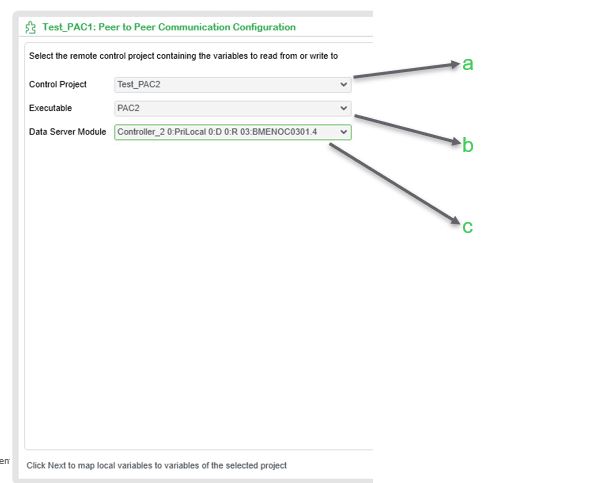
2. A Wizard will start which will guide user for generating P2P communication. In the first screen, User has to select,
a. Remote Control Project, b. Select Executable of selected Control Project, c. Select Communication module which needs to be used for P2P communication.
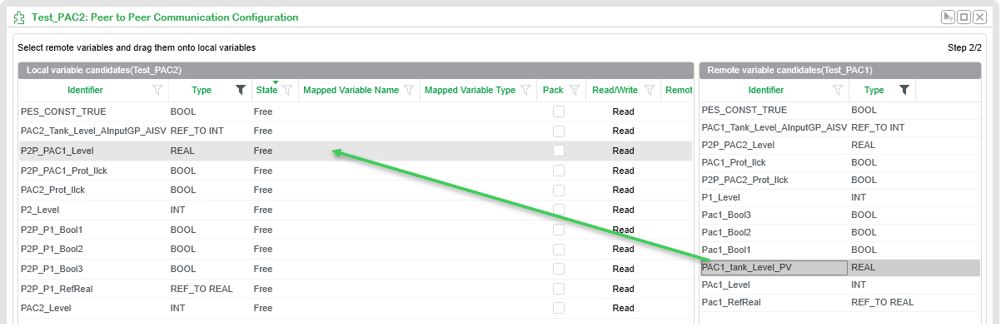
3. The second Window Shows all Variables available in Local Control Project at Left Side and all Variables in Remote Control Project at Right Side. Drag and drop the required Remote variables to be read/write on to the Local Variables.
4. At first time of P2P mapping, a Popup will appear with names of sections to be created, User can modify or else proceed by clicking on Ok.

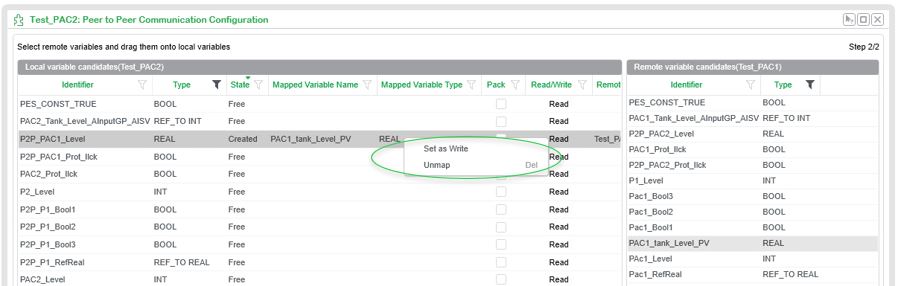
5. You can change the request type (Read/Write) by right click on the mapped line and click on “Set as Write”.
User can delete the Mapping by right click on mapped line and select “Un map”.
6. By Default, Local Controller will communicate via Controller Port, if User wants to change to other communication module. Then Right click on Local Control Project Executable and select Manage.
Here User needs to select required Communication module in Data Server for Peer to Peer communication..

This completes the P2P Communication wizard and User can build & deploy changes to both controllers for starting P2P communication.
Pre-requisites:
1. Controllers must have minimum firmware version, V3.20 for M580 and V3.30 for M340 for Local Project.
2. Data dictionary must be enabled for both Controllers (Local & Remote).
3. The service mapping must be done for the executable of Remote Control Project.
4. Variables are needed to be readily generated on both Local & Remote Control Projects before starting P2P Configuration.
Procedure:
1. Right click on the Local Control project and click on "Manage Peer to Peer" as shown in below screenshot.
2. A Wizard will start which will guide user for generating P2P communication. In the first screen, User has to select,
a. Remote Control Project, b. Select Executable of selected Control Project, c. Select Communication module which needs to be used for P2P communication.
3. The second Window Shows all Variables available in Local Control Project at Left Side and all Variables in Remote Control Project at Right Side. Drag and drop the required Remote variables to be read/write on to the Local Variables.
4. At first time of P2P mapping, a Popup will appear with names of sections to be created, User can modify or else proceed by clicking on Ok.
5. You can change the request type (Read/Write) by right click on the mapped line and click on “Set as Write”.
User can delete the Mapping by right click on mapped line and select “Un map”.
6. By Default, Local Controller will communicate via Controller Port, if User wants to change to other communication module. Then Right click on Local Control Project Executable and select Manage.
Here User needs to select required Communication module in Data Server for Peer to Peer communication..
This completes the P2P Communication wizard and User can build & deploy changes to both controllers for starting P2P communication.