วันนี้เราสามารถช่วยคุณได้อย่างไร?

Can I retrieve a configuration in Product Selector?

Only if the configuration has been saved with an **.se file or if you saved the Product Code
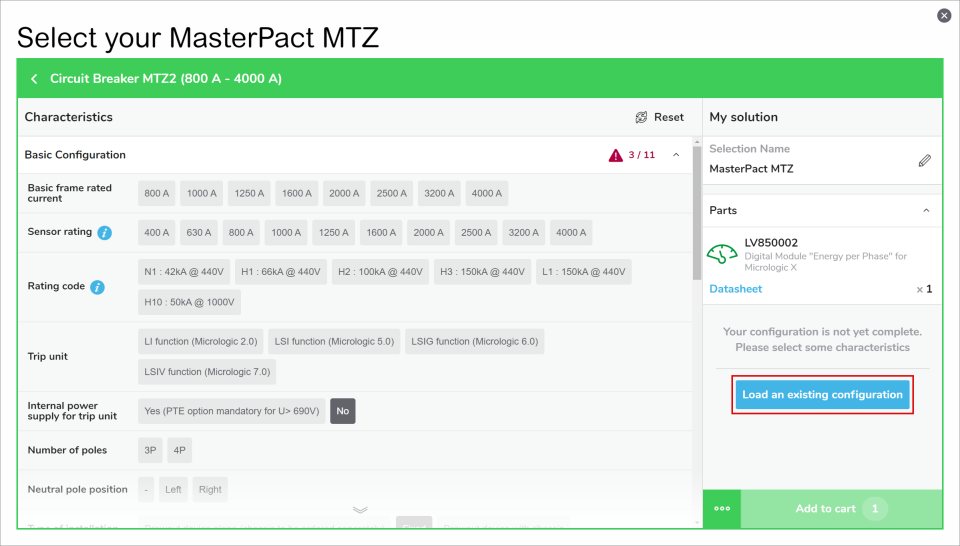
  • Retrieve a configuration with the .se file. Please open any selector and click on the "Load an existing configuration" at the right of the screen. Or click on the "" at the left of the "Add to cart" button, then select "Load an existing configuration". You will then be able to browse in your computer for the .se file, click OK and you will retrieve the full selection and basket.
  • Retrieve a configuration with a Product Code, only for configured product. Please open a selector and click on the "" at the left of the "Add to cart" button, then select "Load an existing configuration"

ชไนเดอร์ อิเล็คทริค Thailand

ต้องการความช่วยเหลือใช่หรือไม่

ต้องการความช่วยเหลือใช่หรือไม่

โปรแกรมช่วยเลือกผลิตภัณฑ์

โปรแกรมช่วยเลือกผลิตภัณฑ์

ค้นหาผลิตภัณฑ์และอุปกรณ์เสริมที่เหมาะสมกับการใช้งานของคุณได้อย่างรวดเร็วและง่ายดาย

ติดต่อฝ่ายขาย

ติดต่อฝ่ายขาย

ติดต่อสอบถามเกี่ยวกับการขายผ่านทางเว็บไซต์ และผู้เชี่ยวชาญจะติดต่อกลับ

สถานที่จัดจำหน่ายอยู่ที่ใด

สถานที่จัดจำหน่ายอยู่ที่ใด

ค้นหาตัวแทนจำหน่าย ชไนเดอร์ อิเล็คทริค ที่ใกล้ตัวคุณที่สุดได้อย่างง่ายดาย

ศูนย์ความช่วยเหลือ

ศูนย์ความช่วยเหลือ

ค้นหาแหล่งข้อมูลเพื่อสนับสนุนความต้องการทั้งหมดของคุณได้จากที่เดียว

  • คู่มือผลิตภัณฑ์
  • ดาวน์โหลดซอฟต์แวร์
  • โปรแกรมช่วยเลือกผลิตภัณฑ์
  • ผลิตภัณฑ์ทดแทนและอะไหล่
  • ศูนย์ช่วยเหลือและการติดต่อ
  • ค้นหาสํานักงานของเรา
  • รับใบเสนอราคา
  • สถานที่จัดจำหน่าย
  • ชุมชน Schneider Electric
  • ร่วมงานกับเรา
  • ข้อมูลบริษัท
  • ร้องเรียนการประพฤติมิชอบ
  • การช่วยการเข้าถึง
  • ห้องข่าว
  • นักลงทุน
  • EcoStruxure
  • ค้นหาตำแหน่งงาน
  • บล็อก
  • นโยบายความเป็นส่วนตัว
  • ประกาศเกี่ยวกับคุกกี้
  • ข้อกำหนดการใช้งาน
  • Change your cookie settings